> ## Documentation Index
> Fetch the complete documentation index at: https://paxos-0ac97319-jg-test-1.mintlify.site/llms.txt
> Use this file to discover all available pages before exploring further.
# Mint
> Convert USD to Paxos-issued stablecoins and receive them in an external wallet.
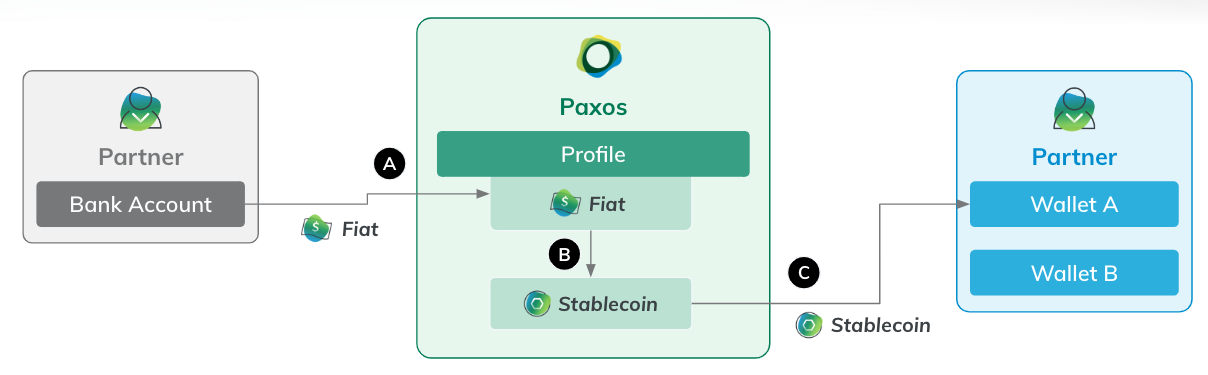
This guide walks you through the standard automated minting flow (**USD > Stablecoin**), where funds are sent via bank transfer and converted into stablecoins on supported blockchain networks. The steps are the same for USDG, PYUSD and USDP.
Watch a demo: See the full minting flow from start to finish before getting started.
## **What You'll Do**
1. [Add a destination wallet address](https://docs.paxos.com/dashboard/mint#withdraw-address) (This is where you'll receive the stablecoin).
2. [Create minting instructions](https://docs.paxos.com/dashboard/mint#minting-instructions), which define:
* **How** you'll send USD to Paxos (SWIFT or ABA, DBS-ACT, CUBIX).
* **Which stablecoin** you want (USDG, PYUSD, USDP).
* **Where** the stablecoin should go (wallet + network).
3. [Send USD to the Paxos platform](https://docs.paxos.com/dashboard/mint#send-usd) using the generated deposit details.
Paxos will automatically mint the stablecoin and send it to your wallet.
## Before you begin
### Requirements
* [A verified Paxos account](https://dashboard.sandbox.paxos.com/signin).
* A role (ex:Treasurer) with permissions to **Add** or **Delete** crypto addresses, and **Create Conversion Rules**.
### Supported Stablecoins and Networks
| Asset | Supported Network |
| ----- | ----------------- |
| USDG | Ethereum, Solana |
| PYUSD | Ethereum, Solana |
| USDP | Ethereum |
## ➊ Add Destination Wallet Address
You must add a wallet address before minting. This is where your stablecoins will be sent.
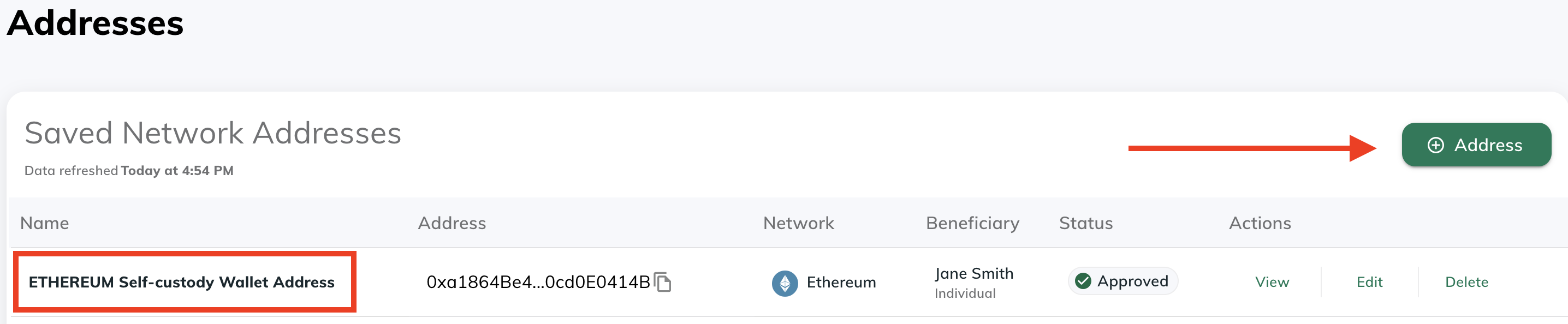
1. Navigate to [**Addresses**](https://dashboard.paxos.com/dashboard/addresses) in the Paxos dashboard.
2. Click **⊕︎ Address**.
3. Enter a **name** for the address and select the **blockchain network**.
4. Retrieve the external wallet address and paste it in the **Network Address** field.
5. Fill in the [beneficiary details](https://docs.paxos.com/dashboard/travel-rule) requirements.
6. Click **Save**
Use the [**Approvals**](https://docs.paxos.com/dashboard/admin/approvals) functionality to require additional team members to review any new addresses before they are saved.
This avoids potential mistakes around incorrect addresses and adds an extra layer of security. **Only approved addresses** can be used in any mint process.
## ➋ Create Minting Instructions
Once your wallet address is added, configure the minting rules for USD > Stablecoin.
Minting instructions are reusable and immutable. Access [Saved Instructions](https://dashboard.paxos.com/dashboard/saved-instructions) to reuse them anytime you want to mint the same asset.
1. Go to [**Dashboard**](https://dashboard.paxos.com/) **> Convert**.
2. Select **USD** as the asset you have. 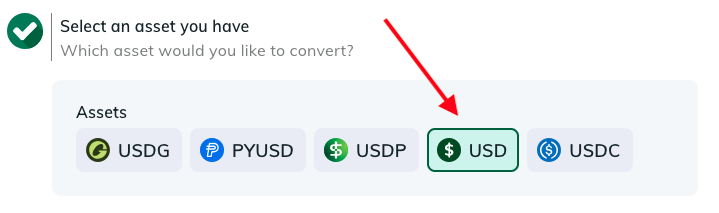
3. Select **External Account/Wallet** and then the fiat network you use to send USD to Paxos. If you choose **DBS-ACT**, it may need to be activated first. [Contact Support](https://support.paxos.com/hc/en-us) for details. 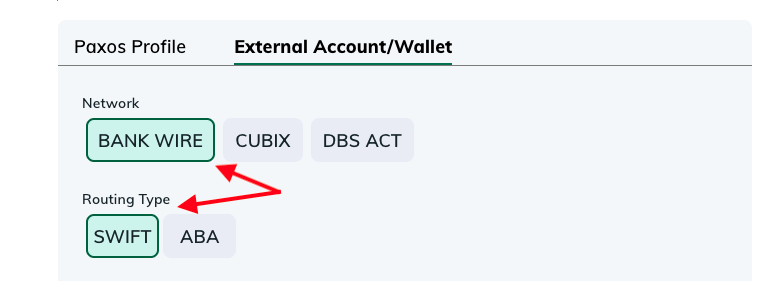
Use the [**Paxos Profile**](https://docs.paxos.com/dashboard/organization#profile) option if you want to hold your stablecoin in your current account.
4. Select a stablecoin (for this guide we're minting [USDG](https://docs.paxos.com/stablecoin/usdg)).
5. For the destination, select **External Account/Wallet** and then choose one of the available networks and one of the existing **Addresses**.
6. Name the instructions. 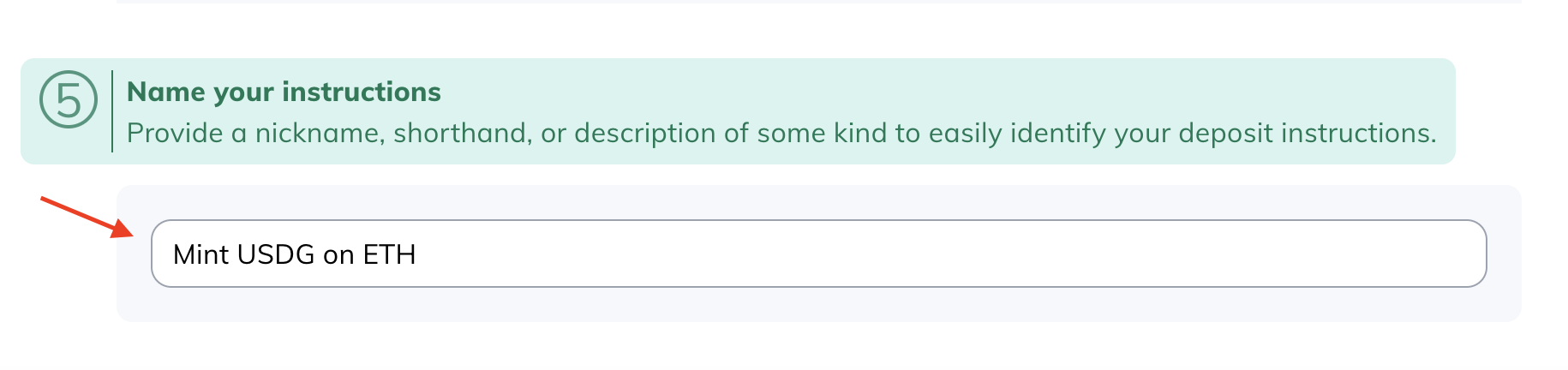
7. Click **Generate Deposit Instructions** to review the minting instructions. You can also download them for reference when sending USD to Paxos.
Test the minting instructions with a small amount before minting large volumes.
## ➌ Send USD to Paxos
Use the [Deposit instructions](https://docs.paxos.com/dashboard/deposit) to send wire funds to Paxos.
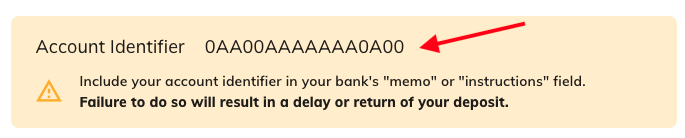
Once the funds are received, Paxos automatically executes the minting instructions and sends the requested stablecoin to the specified wallet.
## ➍ Review Transaction Status
Track your minting progress from the **Transactions >Asset Movements** section. You'll see two entries:
* **Fiat Deposit**: It usually takes a minute or two for the system to show the associated
* **Crypto Withdraw**: The actual crypto withdraw may take anywhere from seconds to hours, depending on the blockchain, mint amount and off-business-hour transactions.
Transactions have the following status:
* **Pending**: The transaction is executing, which may include a manual review. If a transaction is pending for an extended duration, contact Support.
* **Failed**: If a transaction shows the failed status, contact Support.
* **Complete**: The transaction is successful.
Crypto Network Fees: Crypto network fees are calculated at the time of withdraw and deducted from the total deposit amount. Use the **View** action to see a fee breakdown and other transaction details. 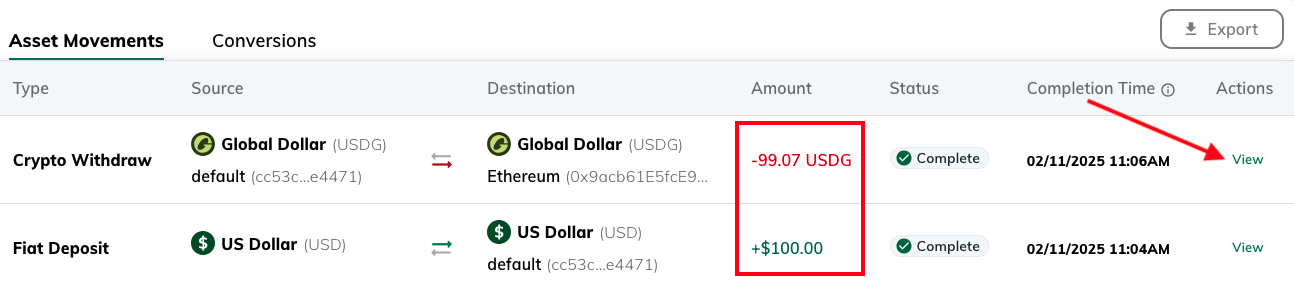
## Alternate Minting Flows
Paxos supports manual minting flows with a number of different options. Following are a few options:
* [Deposit USD](https://docs.paxos.com/dashboard/deposit), then perform a manual [convert](/guides/dashboard/convert)([https://docs.paxos.com/dashboard/convert](https://docs.paxos.com/dashboard/convert)) followed by a [manual transfer](https://docs.paxos.com/dashboard/transfer).
* Use **Convert** to deposit USD and [convert](/guides/dashboard/convert)([https://docs.paxos.com/dashboard/convert](https://docs.paxos.com/dashboard/convert)) it to a stablecoin, keeping it on-platform in the Profile of your choice, followed by a [manual transfer](https://docs.paxos.com/dashboard/transfer).
Can't find the right minting options? The desired option may not be supported by the [Entity](/guides/dashboard/organization#entities)([https://docs.paxos.com/dashboard/organization#entities](https://docs.paxos.com/dashboard/organization#entities)) or by the Paxos platform. Reach out to your [Entity Manager](https://docs.paxos.com/dashboard/roles#entity-manager) or [contact us](https://support.paxos.com/hc/en-us/requests/new) for help.